News
Get More from Neoverse
Get More from Neoverse
Neoverse is more than an LED wall - it gives bowling and entertainment centers new ways to create immersive experiences, personalize events, showcase content, and engage guests throughout their visit.
From competitive bowling and corporate events to custom content, live video, integrated lighting, and scheduled promotions, centers are finding new ways to use Neoverse every day.
How Centers Are Using Neoverse
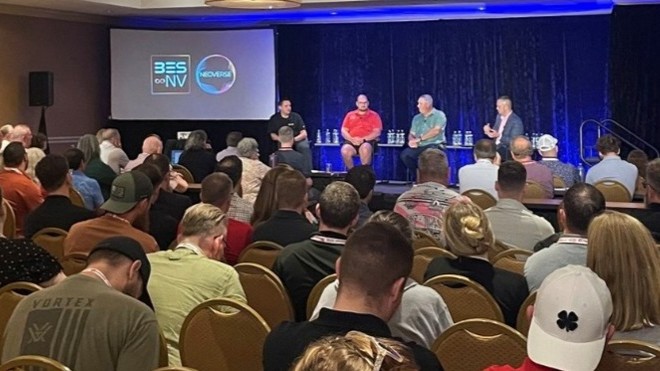
During our Sponsor Pavilion panel at Bowl Expo, Neoverse customers shared how they are using the system to enhance events and create memorable experiences for their guests.
Making Competitive Events More Engaging
“For the events using competitive grids, especially for the kids—it’s awesome that they can see their names and scores on the wall, and their parents also can see what’s going on… For match play, Neoverse is next level.”
— Ashwaubenon Bowling
Displaying player names, scores, animations, and other content directly on the Neoverse wall can make tournaments and competitive events easier to follow while creating a more exciting atmosphere for bowlers and spectators.
Creating a Big-Screen Experience for Corporate Events
“We’ve been able to use Neoverse a lot on the corporate side; we do a lot of fundraisers, corporate events, and a lot of sports team banquets. In the old days, we’d sit there with a projector and play the football teams’ highlight video on a little tiny screen in the party room. Now, they see their highlight video on what is essentially a jumbotron, sixty feet away from them, and that really has set us apart from other options for these groups.”
— Paradise Island Bowl & Beach
With the ability to display custom images, videos, logos, and live content on a large-format LED wall, Neoverse can help transform corporate gatherings, fundraisers, team celebrations, and private events into experiences that feel much bigger than a traditional party-room presentation.
Neoverse Feature Reminders
Continue reading below for information about previously released features and capabilities to get the most out of Neoverse in your center.
Create Immersive Experiences with Integrated Lighting
Neoverse integrates with HyperBump lights, CenterPunch deck lighting, and CenterPunch capping lights, allowing lighting effects to complement the action on the lanes and the content displayed on the LED wall.
More than 60 Neoverse backgrounds support lighting integration, giving centers a wide variety of themes and visual environments for everyday bowling, holidays, special events, and promotions.
Available backgrounds include: Air, Alaska, Bokeh Blue, Bokeh Blue Dark, Bokeh Violet, Bokeh Violet Dark, Bowling Cascade, Bowling Particles, Bubbles, Chicago, Cinco de Mayo, Dots, Dots Dark, Eighties, Eighties Christmas, Eighties Halloween, Elements Blue, Emoji Wall, Entropy Lavendar, Entropy Lavender Black, Entropy Red, Flames, Galaxy Blue, Galaxy Lavender, Gears, Halloween, HyperBowl, Manhattan, Maze Violet, Memphis, Miro Red, Miro Red Dark, Miro Yellow, Miro Yellow Dark, Mondrian, Monster Gallery, Paper Bowl, Party Bowl, Pillars, Pillars Dark, Pins, Riverside, Rounded Squares, Sea, Skyline Red, Steel Wall, St. Patrick, Stripes, Stripes Dark, Summer Beach, Theatre, Underwater, Valentine Clouds, Valentine Cupido, Valentine Hearts, Valentine Objects, Valentine Pattern, Wall Pop, Wave, Wavy Color, Winter, Winter Room, Xmas Tree, and YouToons.
Find Seasonal Content Faster
Seasonally relevant content is highlighted at the top of QPortal and Conqueror Hub through the Seasonal Content slider, making it easier to discover content for holidays, celebrations, and other timely occasions.
Personalize Events with Custom Pictures
Centers can add company logos, photographs, event graphics, sponsor assets, and other JPEG or PNG files to Neoverse.
Custom pictures can also be loaded into templates created in QPortal and selected directly through Conqueror Hub, making it easier to personalize experiences for corporate groups, birthdays, leagues, tournaments, and other events.
Upload Custom Full-Screen Backgrounds
Custom full-screen images and videos can be uploaded directly to Neoverse through QPortal and saved for easy access.
This gives centers another way to create branded event experiences or prepare advertising and promotional content for use throughout the year.
Show Multiple Experiences at Once with Local Scenes
Local Scenes allow the Neoverse wall to be divided into multiple areas displaying different scenarios at the same time.
This means different groups of guests can see content that is relevant to their experience, even when they are using the center simultaneously.
Stream Live Video
Neoverse can display up to eight different external live streaming video sources.
Audio output from videos and scenes can also be incorporated, helping create a more immersive multimedia experience throughout the venue.
Build and Update Playlists Faster
Playlist Cloning makes it easy to duplicate an existing playlist and modify it rather than rebuilding a large playlist from scratch.
For centers managing recurring promotions, events, or seasonal programming, this can make content updates significantly easier.
Schedule Content in Advance
The Neoverse Content Scheduler allows centers to decide in advance what will appear on the LED wall throughout the week.
This can help teams plan recurring promotions, entertainment content, advertising, and other programming without needing to manually select content each time.
Learn more about the Neoverse Content Scheduler on Conqueror Maximization Portal
You can also listen to the Tech Tip podcast about content scheduling
Control Neoverse from Any Device
With Conqueror Hub, operators can control Neoverse from compatible devices rather than remaining tied to a single workstation.
Preview Neoverse Billboards Before Publishing
The Neoverse Billboard Preview in QPortal makes it easier to create and manage billboard content by providing a preview during layout and setup.
Bring Back a Guest Favorite with Lucky Train
The Lucky Train experience familiar to BES X users is also available with updated train graphics designed for the Neoverse wall.
Turn the Neoverse Wall into More Than a Display
Whether you’re running a tournament, hosting a corporate event, creating a branded experience, promoting offers, or simply adding more energy to everyday bowling, Neoverse gives your team a flexible canvas for engaging guests throughout the center.
Explore these features, experiment with different types of content, and discover new ways to make Neoverse part of the experience you deliver to every group that walks through your doors.